Game 3D Text Effect Red Style: Instant Design Impact
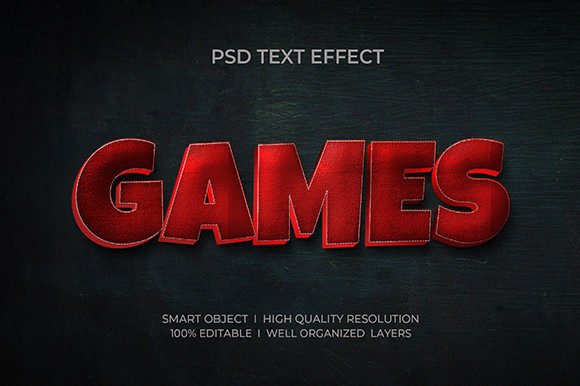
Designers and creators constantly seek tools that deliver high-quality visuals without consuming hours of production time. The Game 3D Text Effect Red Style offers a ready-to-use solution for anyone looking to elevate their text with a bold, dimensional aesthetic. This editable PSD text effect is designed for immediate application, allowing users to replace text effortlessly while maintaining professional-grade output.
What Makes Game 3D Text Effect Red Style Stand Out
At its core, this resource is a layered Photoshop file built with Smart Object replacement, ensuring that users don’t need advanced design skills to make it work. Each file is 300 DPI, RGB color profile, and fully layered for easy customization. The red-themed 3D effect brings energy and intensity—ideal for game titles, promotional banners, or attention-grabbing headers.
Unlike generic text effects, the Game 3D Text Effect Red Style is crafted with precision, combining lighting, depth, and texture to create a realistic 3D appearance. It’s a time-saving asset that maintains visual consistency across different projects, especially when working under tight deadlines or managing multiple design variations.
Creative Applications Across Industries
Whether you're a marketer launching a campaign, a blogger designing a featured image, or an entrepreneur building brand assets, this text effect adapts to a wide range of creative needs. Here are a few ways to integrate it into your workflow:
- Game Development: Use it for title screens, in-game messages, or promotional materials that match the intensity of your game’s visuals.
- Social Media Graphics: Stand out in feeds with bold, stylized headers that reflect the energy of your content or brand.
- Print Media: Apply the effect to posters, flyers, or merchandise mockups where high-resolution detail is essential.
- Web Banners & UI Elements: Enhance website headers or app interfaces with a consistent, professional look.
How to Customize for Maximum Impact
One of the biggest advantages of this resource is its ease of editing. The Smart Object feature allows you to swap out the default text with your own copy while preserving all stylistic effects. Here’s how to make the most of it:
- Open the PSD file in Photoshop and locate the designated Smart Object layer.
- Double-click the layer to open the embedded text file and replace it with your desired message.
- Save and close the Smart Object—Photoshop will automatically update the effect to match your new text.
- Adjust lighting or color if needed, using the pre-organized layers for shadows, highlights, and textures.
Because the layers are well-organized in folders, even beginners can make adjustments without getting lost in complex file structures. This makes the Game 3D Text Effect Red Style ideal for both personal projects and professional work that requires fast turnaround.
Matching the Style to Your Audience
Design is not just about aesthetics—it's about communication. The red 3D effect works especially well for audiences drawn to bold visuals and high-energy content. Consider how different users might apply this style:
- Bloggers: Use it to create eye-catching titles for featured posts or YouTube thumbnails.
- Educators: Make presentation slides more engaging with stylized headings that emphasize key topics.
- Freelancers: Offer premium text effects as part of client deliverables without spending hours on custom designs.
- Small Business Owners: Use the effect in digital ads or packaging mockups to project a polished, professional image.
When choosing how to apply this effect, always consider your audience’s expectations. A vibrant red 3D style might be perfect for gaming or entertainment branding, but less suitable for minimalist or corporate aesthetics. Knowing when to use it—and when to simplify—is key to maintaining visual clarity and relevance.
Staying Consistent and Organized
Working with layered Photoshop files can become overwhelming if not managed properly. Fortunately, this resource is designed with organization in mind. All layers are grouped logically, and folders are labeled for easy navigation. Here’s how to keep your workflow efficient:
- Use Layer Naming Conventions: If you duplicate or modify layers, rename them to reflect their purpose.
- Keep Backups: Save a copy of the original file before making edits to preserve the template for future use.
- Export Smartly: When exporting for web or print, ensure you’re using the correct resolution and file format (PNG for transparency, JPG for compression).
By maintaining a clean file structure, you’ll save time during future edits and reduce the risk of errors. The Game 3D Text Effect Red Style is built to support this kind of efficient, scalable design process.
Exploring Variations and Extensions
While the red 3D effect is powerful on its own, you can push your creativity further by experimenting with variations. Try adjusting the color scheme to match different themes—swap red for neon green for a sci-fi vibe or metallic gold for luxury branding. You can also add background textures, gradients, or overlays to enhance the depth and realism of your text.
For those comfortable with Photoshop, blending multiple effects or combining this with other PSD resources can lead to unique, custom results. However, even without advanced skills, the base effect delivers a high-quality finish that stands out in most visual contexts.