Top Up Game Effect & Editable Text Made Easy
Creating stunning visuals for your projects doesn’t have to be complicated. The Top Up Game Effect and Editable Text package gives designers, marketers, and creators a powerful tool to produce vibrant 3D text effects without any technical hurdles. Built for Adobe Illustrator, this resource allows you to generate eye-catching designs with just a few clicks—no plugins, actions, or extra textures needed.
What You Get and How It Works
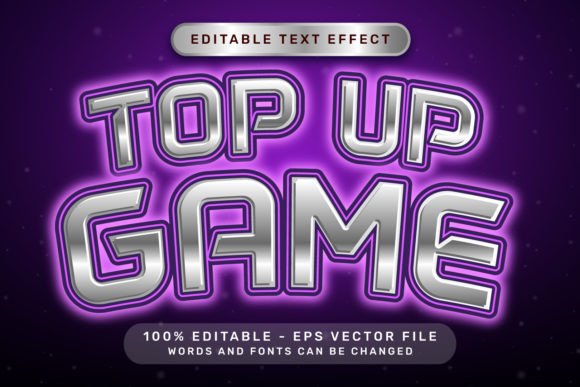
This package includes a high-quality Adobe Illustrator 3D text effects EPS file along with a 7000 x 4000px .jpg preview. The design features a light neon color palette accented with playful elements like ribbon bows and balloons, making it ideal for game-related content, promotions, or celebratory visuals.
Using it is straightforward: simply select the text layer, edit the sentence or choose your preferred font, and watch the 3D effect update automatically. Alternatively, you can access the effect through the Window – Graphic Styles menu for more control and customization.
Perfect for a Wide Range of Projects
Whether you're a beginner or a seasoned designer, this editable text effect opens up creative possibilities across many fields. Here are just a few examples of how it can be used:
- Game developers can enhance title screens, promotional banners, or in-game messages with a polished, neon-lit look.
- Bloggers and social media creators can craft engaging graphics for posts, stories, or thumbnails that stand out in a crowded feed.
- Small business owners can design digital ads, flyers, or website banners without hiring a professional designer.
- Educators and trainers can make learning materials more visually appealing, especially for younger audiences or online courses.
Why This Design Style Works
The light neon color scheme combined with festive elements like ribbons and balloons gives this effect a fun, energetic feel. It’s especially effective for designs aimed at younger audiences or for events and promotions that want to convey excitement and joy.
Unlike static fonts or basic text effects, the Top Up Game Effect and Editable Text allows full customization. You can tweak colors, lighting, depth, and layout to match your brand or project style—without needing advanced 3D modeling skills.
Getting the Most from Your Design Tool
Because everything is vector-based and fully editable, you can scale your designs without losing quality. This makes the file ideal for both digital and print use, from mobile app graphics to large posters.
Here are a few tips to help you make the most of this resource:
- Experiment with fonts – Different fonts can dramatically change the look and feel of your text. Try bold, rounded, or handwritten styles to see what fits best.
- Adjust colors to match your brand – The neon palette is a great starting point, but you can easily tweak hues to align with your logo or campaign colors.
- Layer with other elements – Combine the text effect with icons, illustrations, or background gradients to create more dynamic visuals.
Who Should Use This Effect?
This tool is ideal for anyone who wants to create high-quality 3D text without a steep learning curve. Whether you're a hobbyist designing for fun, a freelancer working on client projects, or a small business owner building your own marketing materials, this effect streamlines the creative process.
It’s especially useful for those who work with Adobe Illustrator but don’t have time to build complex 3D effects from scratch. With just a few clicks, you can turn plain text into a vibrant, attention-grabbing design.
What to Consider Before Using
While this effect is designed to be user-friendly, there are a few things to keep in mind:
- Software compatibility – Make sure you're using a version of Adobe Illustrator that supports EPS files and graphic styles.
- Editing limitations – While the text is fully editable, some visual elements like shadows or glows may need minor manual adjustments after changing fonts.
- File size – The high-resolution .jpg preview is great for quick viewing, but be mindful of file sizes when using in web projects or email campaigns.
Enjoy the Creative Process
The creators of the Top Up Game Effect and Editable Text designed it with fun and flexibility in mind. As you explore the possibilities, you’ll likely find yourself experimenting more and enjoying the creative process—just as they intended.
Whether you're designing a game interface, a birthday invitation, or a promotional graphic, this effect brings a touch of vibrancy and professionalism to your work. And with everything included in one clean, easy-to-use package, there’s no reason not to give it a try.